Documentation for Substance 3D Painter is now available on Experience League. After March 14th, HelpX pages will automatically redirect to the equivalent Experience League page.
Refer to the FAQ for more information about which documentation is affected.
Last updated on
Jul 13, 2023

- Substance 3D home
- Home
- Getting Started
- Getting Started overview
- Activation and licenses
- System requirements
- Project creation
- Export
- Export overview
- Export window
- Output templates
- Export overview
- Glossary
- Getting Started overview
- Interface
- Interface overview
- Assets
- Substance 3D Assets
- Color picker
- Display settings
- History
- Layer stack
- Main menu
- Project configuration
- Properties
- Settings
- Shader settings
- Texture Set
- Toolbars
- Viewport
- Miscellaneous
- Painting
- Painting overview
- Paint tools
- Path tools
- Path tool overview
- Paint along path
- Ribbon path
- Filled path
- Erase along path
- Smudge along path
- Straight line
- Lazy mouse
- Symmetry
- Fill projections
- Presets
- Presets overview
- Creating and saving presets
- Creating particles presets
- Photoshop brush presets
- Dynamic strokes
- Advanced channel painting
- Vector graphic (.svg & .ai)
- Text resource
- Effects
- Baking
- Content
- Creating custom effects
- Importing assets
- Creating custom effects
- Features
- Automatic resource update
- Automatic UV Unwrapping
- Physical size
- Smart Materials and Masks
- Subsurface Scattering
- Dynamic Material Layering
- UV Reprojection
- UV Tiles
- Color Management
- Post Processing
- Iray Renderer
- Plugins
- Sparse Virtual Textures
- Custom Shaders
- SpaceMouse® by 3Dconnexion
- Universal Scene Description (USD)
- Send to
- Technical Support
- Performance Guidelines
- Configuring Pens and Tablets
- Exporting the log file
- Exporting a DXDiag
- Technical issues
- GPU Issues
- Crash when working with overclocked GPU
- Forcing the external GPU on Mac OS
- GPU drivers compatibility
- GPU drivers crash with long computations (TDR crash)
- GPU has outdated drivers
- GPU is not recognized
- GPU is not recognized and is mentionned as GDI Generic
- Issues with Nvidia GPUs on recent Mac OS versions
- Multi/Bi-GPU
- Running on integrated GPU
- Painter doesn't start on the right GPU
- Startup Issues
- Rendering Issues
- Stability Issues
- Miscellaneous Issues
- GPU Issues
- Workflow Issues
- Export Issues
- Tools Issues
- Project Issues
- Library Issues
- Viewport Issues
- Plugins Issues
- License Issues
- Pipeline and integration
- Installation and preferences
- Configuration
- Resource management
- Scripting and development
- Scripts and plugins
- Shader API Reference
- Shader API overview
- Changelog - Shader API
- Libraries - Shader API
- Lib Alpha - Shader API
- Lib Bayer - Shader API
- Lib Defines - Shader API
- Lib Emissive - Shader API
- Lib Env - Shader API
- Lib Normal - Shader API
- Lib PBR - Shader API
- Lib PBR Aniso - Shader API
- Lib Pom - Shader API
- Lib Random - Shader API
- Lib Sampler - Shader API
- Lib Sparse - Shader API
- Lib SSS - Shader API
- Lib Utils - Shader API
- Lib Vectors - Shader API
- Parameters - Shader API
- Shaders - Shader API
- Release notes
- Release notes overview
- All Changes
- Version 11.1
- Version 11.0
- Version 10.1
- Known issues
- Old versions
- Version 10.0
- Version 9.1
- Version 9.0
- Version 8.3
- Version 8.2
- Version 8.1
- Version 7.4
- Version 7.3
- Version 7.2
- Version 2021.1 (7.1.0)
- Version 2020.2 (6.2.0)
- Version 2020.1 (6.1.0)
- Version 2019.3
- Version 2019.2
- Version 2019.1
- Version 2018.3
- Version 2018.2
- Version 2018.1
- Version 2017.4
- Version 2017.3
- Version 2017.2
- Version 2017.1
- Version 2.6
- Version 2.5
- Version 2.4
- Version 2.3
- Version 2.2
Automatic UV Unwrapping
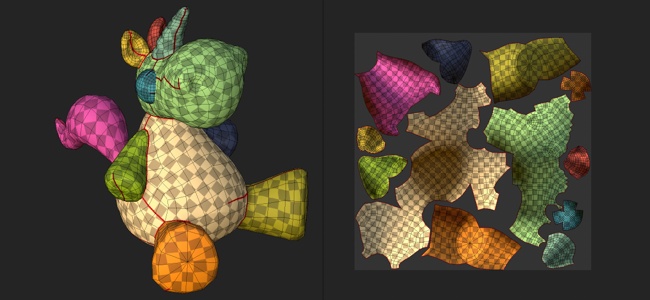
The automatic UV unwrapping allow to generate UV islands automatically when importing a 3D model. It can be used to paint on 3D model that don't have any existing UVs.
Enabling the automatic UV unwrapping

When creating a new project or re-importing a mesh into an existing project, make sure the setting "Auto-unwrap" is checked. If disabled, the process will be skipped and mesh UVs will remain as-is.
UV unwrapping settings

When importing a mesh and using the unwrapping process, the following settings are available. Some settings are available via the Options button in the interface.
|
Section |
Setting |
Description |
|---|---|---|
|
Unwrap sequence |
Seams |
Controls if the seams (UV island borders) should be generated only for meshes that don't have them or always regenerated. Possible values:
|
|
UV islands |
Controls if the UV unwrapping should generated from meshes without UVs or for any meshes. Possible values:
|
|
|
Packing |
Controls the packing/layout of UV islands of the meshes. Possible values:
|
|
|
Layout customization |
Margin size |
Defines the spacing between UV islands. This setting applies a general percentage independent from the resolution. Possible values:
|
|
UV island orientation |
Control the orientation of the UV islands during the packing process. Possible values:
|
|
|
UV Tiles |
Maximum number of UV Tiles |
If the UV Tiles workflow is enabled, this settings determine the maximum number of tiles to produce to distribute on the UV islands. |
|
Optimization |
Avoid elongated UV islands |
If enabled, this process will split UV islands considered too long to improve the usage of the texture space. Example of before (top) and after (bottom): 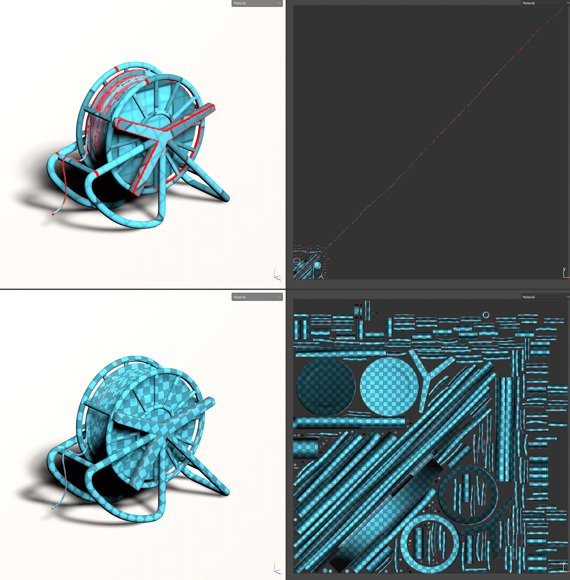
|
Known limitations
Below is a list of limitations related to the unwrapping process:
- Processing high poly meshes can take a long time.
- Vertices at the exact same coordinates are merged
- UV Generation may fail on some mesh parts in some rare cases
- Non uniform or highly distorted texel ratio in a single UV island in some cases
- Non uniform texel ratio between Texture Sets
- UV island generated can be very elongated and do not fit into UV space in some cases
- Degenerated faces or non-triangular mesh faces with small or overlapping edges may not get UV unwrapped
